


Graphing calculator plus 84 83
4.62.09K Reviews
App Specs
- Version
- 7.5.1.483
- Updated On
- License
- Free
- Downloads
- 1,000,000+
- Developer
- lethinhien
- Categories
- Education
- Platform
- Android
Screenshots
 Analysis by AppCompare
I spent time with Graphing calculator plus 84 83 as a practical mathematics tool rather than treating it like a simple four-function calculator. It is an Android education app from lethinhien, aimed at people who need graphing, equation solving, algebra work, and fraction handling in one place. My first impression was that it tries to recreate the usefulness of a dedicated scientific or graphing calculator on a phone, while keeping the entry point familiar enough for homework and everyday study.
The app is free to install and is suitable for Everyone. It has reached over one million installs, with an average rating of 4.6 from around fourteen thousand ratings and about two thousand one hundred written reviews. Those figures suggest that it has found a real audience, but they do not replace personal fit: a student checking a quadratic has different needs from someone who wants a polished classroom replacement or a quick calculation tool.
What I like most is the concentration of mathematical tasks. I can move from a fraction calculation to an equation, then inspect a graph without changing apps. That makes it more useful than a basic calculator, especially when I am trying to understand a result rather than merely obtain it. At the same time, the interface asks for patience, and people who prefer a very visual, guided learning experience may find it more functional than friendly.
How the interface handles different reading and navigation needs
I look at navigation through the lens of pace: the useful question is not how quickly I can reach every operation, but whether I can keep the problem and its symbols clear while moving between them. For readers who benefit from predictable routines, choosing the task first and checking the expression before switching views can make the experience easier to follow. That leads naturally to a closer look at how this calculator’s layout supports—or complicates—different ways of reading and interacting.
A calculator layout that rewards deliberate use
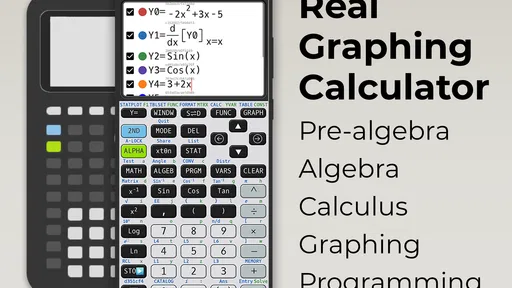
The central challenge with any graphing calculator on a phone is density. A physical calculator has dedicated keys, a stable shape, and tactile separation. On a touchscreen, the same collection of operations competes for space. In my use, Graphing calculator plus 84 83 feels best when I slow down, identify the mode I need, and enter one expression at a time. It is not the kind of app I would use while rushing between several tasks.
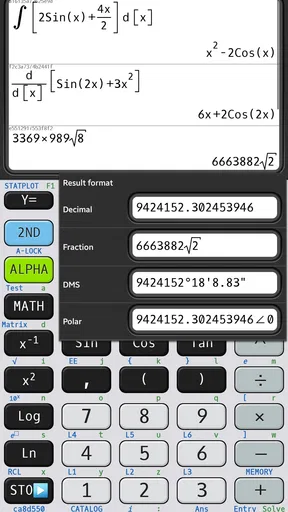
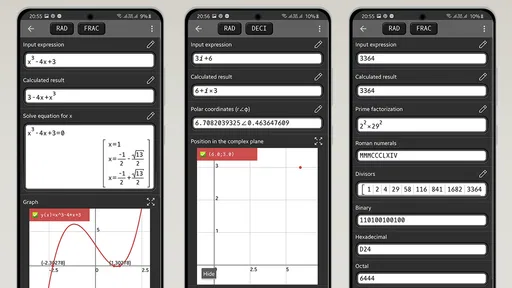
The short description calls it a graphing calculator, but the broader experience goes beyond plotting. Algebra and equation-solving tools make it useful for checking a worked example, while fraction support helps when decimal answers would hide the structure of a problem. That combination matters for readability: seeing a fraction or an equation in its mathematical form can be easier to interpret than converting everything into decimals and trying to reconstruct the original relationship.
I found that the app is most approachable when I treat each calculation as a small workflow. First I decide whether I am entering a numerical expression, an equation, or a graph. Then I check the symbols before evaluating. This sounds obvious, but it reduces mistakes caused by switching between ordinary arithmetic and algebraic notation. A reader who has difficulty scanning crowded interfaces may benefit from this slower routine more than from trying to explore every function at once.
Worth Reading Before You Choose

EA SPORTS FC Mobile 26 Is a Bigger Football Game, but It Takes Time

Flipboard Shows What News Apps Must Do Beyond the Feed

Switching to Android Auto Means Rethinking Your Driving Routine

Google Calendar Makes a Crowded Week Easier to Manage

Ludo King Makes the Most of the Minutes Between Plans

Baby Panda World Brings Quick Play to Modern Phones, but Its Game Library Feels Busy
Where visual clarity helps and where it depends on the user
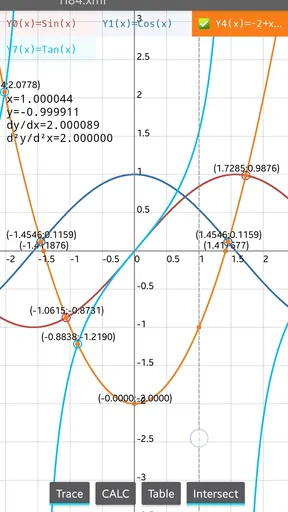
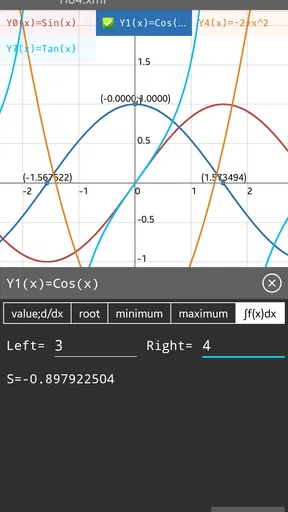
Graphs can make a difficult relationship easier to understand because a curve or line communicates change at a glance. For a learner who struggles with long symbolic steps, plotting an expression can provide a second route into the problem. I particularly value that as a way to compare an expected shape with the result I entered. If the graph looks completely wrong, I know to inspect the expression before trusting the answer.
That visual strength also creates a limitation. A graph is not automatically clearer for everyone. Users with low vision, color-vision differences, or difficulty distinguishing fine lines may prefer the equation and numerical output instead. I would not rely on the graph alone for an important answer; I would pair it with algebraic checking or a displayed value. The app gives me mathematical views, but I still need to choose the view that suits the person and the task.
Text-heavy mathematical notation can also become tiring during a long study session. The app is more comfortable for short checks and focused practice than for reading a complete lesson. It does not replace a textbook explanation that introduces a concept gradually. I see it as a responsive workspace: useful when I already know what I want to test, less helpful when I need the app to teach the idea from the beginning.
Navigation habits that make the tool less frustrating
My practical advice is to keep a clear distinction between exploration and submission. During exploration, I might change an expression, inspect a graph, or compare a fraction with its decimal form. Before copying an answer into homework, I re-enter or review the expression and confirm that I am looking at the intended mode. This is especially important when a small symbol changes the meaning of a calculation.
I also recommend using the app beside written work rather than replacing written work. Writing down the original equation gives me something to compare against when the screen becomes crowded. For students who find multi-step navigation difficult, this external reference can reduce the mental load: the phone handles evaluation and visualization, while the paper preserves the plan.
Motor and sensory considerations in everyday use
A touchscreen calculator removes the need to carry a separate device, but it does not remove input demands. Accurate tapping matters, particularly when several keys or mathematical symbols are close together. Someone with limited fine-motor control may find repeated entry tiring, and accidental taps can be more disruptive in an equation than in a simple sum. I would use the app with deliberate finger placement and review the expression before accepting the result.
There is also a sensory side to the experience. A graphing screen can be visually busy, while a long equation requires sustained attention. In a quiet study environment, that may be manageable. In a noisy classroom, on public transport, or while tired, I would expect more entry errors simply because attention is divided. The app is situationally accessible when the user can control the pace and check the screen, but less comfortable when rapid input is required.
For someone who experiences screen fatigue, short sessions are a sensible approach. I would solve a small set of related problems, record the results, and then step away instead of keeping the graph open indefinitely. This is not a criticism unique to this app; it is a consequence of placing a dense mathematical instrument on a small display. Still, it affects whether the tool feels supportive or exhausting.
The app runs on Android 7.0 or later, which makes it available to people using a range of older compatible devices. The current version is 7.5.1.483. That broad device reach is useful for families and students who are not using the newest phone, although the actual comfort of the interface will still depend on the screen and the device’s responsiveness. A smaller display may make the same controls feel more cramped than they do on a larger one.
Situational access: homework, revision, and quick checking
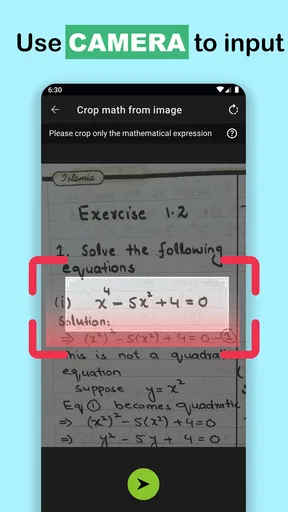
One realistic scenario is a student revising quadratic equations at a kitchen table. They can enter an equation, use the algebra tools to inspect the result, and graph the related expression to see how the roots connect to the curve. If the student is unsure whether a negative sign was entered correctly, the graph offers a useful visual warning. The app does not do the explaining for them, but it gives several ways to check the same piece of work.
Another useful situation is fraction-heavy homework. A basic phone calculator often pushes users toward decimals, which can make it harder to compare an answer with the form expected in class. Here, fraction support makes it more practical to preserve exact-looking results during checking. I would still follow the teacher’s required method, because a correct output is not the same as showing understanding.
For a tutor or parent, the app can serve as a quick demonstration tool. I can test a changed coefficient, look at how the graph responds, and use that comparison to start a conversation. This is more productive than handing over a final answer because it turns the calculator into a question generator: what changed, why did the curve move, and which part of the equation caused it?
It is also useful when a dedicated graphing calculator is unavailable. A phone is easier to keep close, and the free entry price removes a major barrier for someone who only occasionally needs graphing or equation solving. However, a phone can introduce distractions, notifications, or classroom restrictions. In a controlled exam setting, I would follow the institution’s rules rather than assume that a phone-based calculator is acceptable.
Who benefits most from this particular design
I think the strongest audience is students who already understand basic mathematical notation and want a compact way to verify work. It also suits independent learners who like comparing symbolic, numerical, and graphical results. The app is a good fit when the question is, “Did I enter this correctly?” or “What does this equation look like?” rather than, “Can you teach me this entire topic step by step?”
It may also help adults returning to algebra who want a private practice tool. Being able to test an expression without asking someone else for every small check can make revision less intimidating. Fractions and graphs are particularly useful here because they expose relationships that a plain calculator can conceal.
I would be more cautious about recommending it as the only tool for a beginner who needs extensive explanations, guided hints, or a structured course. A dedicated learning platform may be better for that person. Likewise, users who need a highly tactile interface, strong spoken guidance, or specialized accessibility options should compare their requirements carefully before relying on a touchscreen graphing calculator.
Remaining barriers and honest trade-offs
The biggest barrier is not mathematical power; it is interpretation. A solver can produce an answer without helping me understand why that answer is valid. If I enter the wrong equation, the app may still calculate something perfectly precise. That is why I consider expression review and independent estimation essential habits. The more advanced the problem, the less sensible it is to treat the displayed result as unquestionable.
Another trade-off is the balance between convenience and distraction. Having graphing, algebra, and fraction tools on a phone is convenient, but the same phone is not a dedicated study instrument. Someone who loses focus easily may work better with a physical calculator or a desktop tool. The app wins on portability, while a separate calculator can feel calmer and more predictable during repeated practice.
There is also a difference between mathematical capability and presentation quality. A graphing calculator can be powerful while still requiring users to learn its habits. I would not choose this app expecting a polished lesson sequence or a gentle tutorial for every operation. I would choose it because it puts several useful calculation modes within reach and lets me investigate a result from more than one angle.
The optional purchases range from ninety-nine cents to three dollars and ninety-nine cents per item. Since the app is free to start, I can assess the basic workflow before deciding whether any paid element is worthwhile. My advice is not to purchase anything simply because a function looks advanced; first confirm that it fits the problems you actually solve. For occasional homework checking, the free starting point may be enough.
Comparing it with ordinary alternatives
Compared with a standard calculator app, this one is clearly more suitable for algebraic work and visual investigation. A basic calculator is faster for splitting a bill, checking a percentage, or doing a quick total because it presents fewer choices. I would keep using a simple calculator for those tasks rather than opening a graphing tool every time.
Compared with a dedicated graphing calculator, the phone app is easier to obtain and more portable, especially for someone who already carries an Android device. The physical alternative may be preferable when tactile keys, classroom familiarity, or distraction-free operation matter most. A desktop mathematics program may offer a larger canvas and better comfort for extended graph exploration, while this app is more convenient for short checks away from a desk.
Compared with a lesson-based math app, Graphing calculator plus 84 83 is more of an instrument than a teacher. I would use a learning app to build a concept, then use this one to test examples and inspect patterns. That combination respects the strengths of each option instead of asking one calculator to provide explanations it was not designed to deliver.
An inclusive verdict for real-world use
After using it as a study and checking tool, I see Graphing calculator plus 84 83 as a capable free option for people who need more than arithmetic but do not want to buy a separate device immediately. Its support for graphs, equations, algebra, and fractions gives learners several ways to approach the same problem. That flexibility can be genuinely helpful for different learning preferences, particularly when a symbolic answer alone feels too abstract.
Its inclusive value depends on context. The app can support users who benefit from visual graphs, exact fraction forms, or the ability to work privately at their own pace. It is less suitable for people who need large, tactile controls, extensive spoken guidance, or a structured teaching path. I would also avoid using it as the sole authority for important work; checking the entered expression and understanding the method remain essential.
For me, the best workflow is simple: write the problem down, enter it carefully, compare the numerical or algebraic result with the graph, and then explain the answer in my own words. That approach turns the app from an answer machine into a checking and exploration tool. If that matches what you need, the combination of free access, broad mathematical functions, and compatibility with Android 7.0 or later makes it worth trying.
My final recommendation is therefore positive but specific. Choose it if you want a portable graphing calculator for homework, revision, and equation checking, and if you are comfortable navigating a dense touchscreen interface. Skip it as your main choice if your priority is guided instruction, tactile input, or a distraction-free professional calculator. For the right user, this is a practical mathematical workspace rather than just another calculator, and that distinction is what makes it useful.
Pros
- Includes familiar 83/84-style calculator functions
- Useful for graphing equations
- tables
- and inequalities
- Supports complex calculations beyond basic arithmetic
- Helpful for students practicing algebra and trigonometry
- Lightweight app that is easy to use on the go
Cons
- The interface may feel dated compared with modern calculator apps
- Some features may require time to learn without a physical keypad
- Small phone screens can make graphs and menus harder to view
- Advertising may interrupt use in the free version
- Accuracy depends on entering expressions with the correct syntax
FAQs for Graphing calculator plus 84 83
What is Graphing calculator plus 84 83, and who is it designed for?
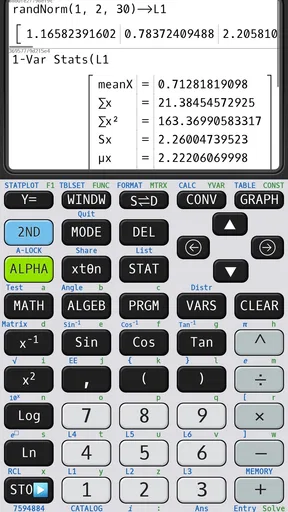
Graphing calculator plus 84 83 is a mobile calculator app designed to reproduce many functions associated with classic graphing calculators, including equation solving, graph plotting, scientific calculations, and statistical tools. It can be useful for high-school and college students, teachers, and anyone who needs advanced calculations without carrying a physical calculator. Its usefulness will depend on the exact features available in the installed version and the user’s device.
Can Graphing calculator plus 84 83 plot equations and functions?
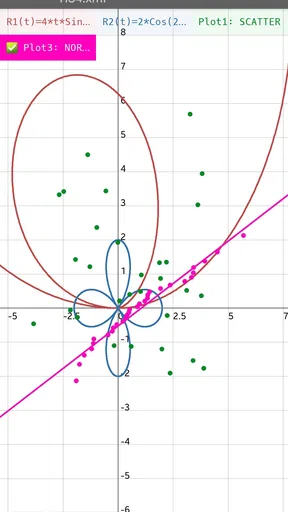
Yes, the app is intended to help users visualize mathematical functions by entering equations and displaying their graphs. This can make it easier to study algebra, trigonometry, inequalities, and other topics where a visual representation is helpful. Before downloading, users should check whether the app supports the specific graph types they need, such as parametric, polar, or piecewise functions, because feature availability may vary.
Does Graphing calculator plus 84 83 work offline?
Many calculator operations can generally be performed without an internet connection once the application is installed, which is convenient for classrooms, homework, travel, or areas with limited connectivity. However, certain functions may require internet access, such as advertisements, updates, help content, synchronization, or optional online services. It is recommended to test the app offline before relying on it during an exam or important assignment.
Is Graphing calculator plus 84 83 suitable for exams?
The app may be useful for practicing problems and checking calculations, but whether it is allowed during an exam depends entirely on the school, teacher, testing organization, or examination rules. Some assessments permit approved calculator applications, while others prohibit phones and tablets altogether. Users should confirm the regulations in advance and avoid assuming that an app designed to resemble a graphing calculator is automatically accepted.
Is Graphing calculator plus 84 83 free to download and use?
The application may be available as a free download, but the final experience can depend on in-app purchases, advertising, or premium features. Some advanced tools, customization options, or ad-free use may require payment. Before installing, review the current Google Play Store or Apple App Store listing for pricing, subscriptions, supported devices, privacy details, and recent user feedback so there are no surprises after downloading.


